How to Manage Static Sites in App Platform

Validated on 24 Feb 2024 • Last edited on 5 Mar 2026

App Platform is a fully managed Platform-as-a-Service (PaaS) that deploys applications from Git repositories or container images. It automatically builds, deploys, and scales components while handling all underlying infrastructure.

You can add a static site as an additional component of your app at any time by updating the app.

Note
If your app consists entirely of a static site, use the standard app creation process. The following instructions apply if you’re adding a static site as a single resource to an existing app.

Add a Static Site to an App Using Automation

You can add a static site to an app using the CLI’s app update command or the API’s app update endpoint. To add a static site, update the app spec with the static site’s specifications and submit the spec using the following command or endpoint.

How to Add a Static Site to an App Using the DigitalOcean CLI
  1. Install doctl, the official DigitalOcean CLI.
  2. Create a personal access token and save it for use with doctl.
  3. Use the token to grant doctl access to your DigitalOcean account.
    doctl auth init
  4. Finally, run doctl apps update. Basic usage looks like this, but you can read the usage docs for more details:
    doctl apps update <app id> [flags]
    The following example updates an app with the ID f81d4fae-7dec-11d0-a765-00a0c91e6bf6 using an app spec located in a directory called /src/your-app.yaml. Additionally, the command returns the updated app’s ID, ingress information, and creation date:
    doctl apps update f81d4fae-7dec-11d0-a765-00a0c91e6bf6 --spec src/your-app.yaml --format ID,DefaultIngress,Created
How to Add a Static Site to an App Using the DigitalOcean API
  1. Create a personal access token and save it for use with the API.
  2. Send a PUT request to https://api.digitalocean.com/v2/apps/{id}.

cURL

Using cURL:

curl -X PUT \
-H "Content-Type: application/json" \
-H "Authorization: Bearer $DIGITALOCEAN_TOKEN" \
"https://api.digitalocean.com/v2/apps/{id}" \
-d '{"alerts":[{"rule":"DEPLOYMENT_FAILED"},{"rule":"DOMAIN_FAILED"}],"domains":[{"domain":"example.com","type":"PRIMARY","zone":"example.com"}],"envs":[{"key":"API_KEY","scope":"RUN_AND_BUILD_TIME","type":"SECRET","value":"EV[1:zqiRIeaaYK/NqctZDYzy6t0pTrtRDez8:wqGpZRrsKN5nPhWQrS479cfBiXT0WQ==]"}],"features":["buildpack-stack=ubuntu-22"],"ingress":{},"name":"example-app","region":"nyc","services":[{"autoscaling":{"max_instance_count":4,"metrics":{"cpu":{"percent":70}},"min_instance_count":2},"git":{"branch":"main","repo_clone_url":"https://github.com/digitalocean/sample-nodejs.git"},"internal_ports":[8080],"log_destinations":[{"name":"your_log_consumer_name","open_search":{"endpoint":"logs.example.com:12345","basic_auth":{"user":"doadmin","password":"1234567890abcdef"},"index_name":"example-index","cluster_name":"example-cluster"}}],"name":"sample-nodejs","run_command":"yarn start","source_dir":"/"}]}'

Python

Using PyDo, the official DigitalOcean API client for Python:

import os
from pydo import Client

client = Client(token=os.environ.get("DIGITALOCEAN_TOKEN"))
req = {
"spec": {
    "name": "web-app-01",
    "region": "nyc",
    "domains": [
        {
            "domain": "app.example.com",
            "type": "DEFAULT",
            "wildcard": True,
            "zone": "example.com",
            "minimum_tls_version": "1.3",
        }
    ],
    "services": [],
    "static_sites": [
        {
            "cors": {
                "allow_origins": [
                    {"exact": "https://www.example.com"},
                    {"regex": "^.*example.com"},
                ],
                "allow_methods": [
                    "GET",
                    "OPTIONS",
                    "POST",
                    "PUT",
                    "PATCH",
                    "DELETE",
                ],
                "allow_headers": ["Content-Type", "X-Custom-Header"],
                "expose_headers": ["Content-Encoding", "X-Custom-Header"],
                "max_age": "5h30m",
                "allow_credentials": False,
            },
            "routes": [{"path": "/api", "preserve_path_prefix": True}],
        }
    ],
    "jobs": [
        {
            "name": "api",
            "gitlab": {
                "branch": "main",
                "deploy_on_push": True,
                "repo": "digitalocean/sample-golang",
            },
            "image": {
                "registry": "registry.hub.docker.com",
                "registry_type": "DOCR",
                "repository": "origin/master",
                "tag": "latest",
            },
            "dockerfile_path": "path/to/Dockerfile",
            "build_command": "npm run build",
            "run_command": "bin/api",
            "source_dir": "path/to/dir",
            "envs": [
                {
                    "key": "BASE_URL",
                    "scope": "BUILD_TIME",
                    "type": "GENERAL",
                    "value": "http://example.com",
                }
            ],
            "environment_slug": "node-js",
            "log_destinations": {
                "name": "my_log_destination",
                "papertrail": {
                    "endpoint": "https://mypapertrailendpoint.com"
                },
                "datadog": {
                    "endpoint": "https://mydatadogendpoint.com",
                    "api_key": "abcdefghijklmnopqrstuvwxyz0123456789",
                },
                "logtail": {
                    "token": "abcdefghijklmnopqrstuvwxyz0123456789"
                },
               "open_search": {
                    "endpoint": "https://myopensearchendpoint.com:9300"
                    "index_name": "logs"
                    "basic_auth": {
                        "user": "doadmin",
                        "password": "password"
                    }
                },
            },
            "instance_count": 2,
            "instance_size_slug": "apps-s-1vcpu-0.5gb",
            "kind": "PRE_DEPLOY",
        }
    ],
    "workers": [
        {
            "name": "api",
            "gitlab": {
                "branch": "main",
                "deploy_on_push": True,
                "repo": "digitalocean/sample-golang",
            },
            "image": {
                "registry": "registry.hub.docker.com",
                "registry_type": "DOCR",
                "repository": "origin/master",
                "tag": "latest",
            },
            "dockerfile_path": "path/to/Dockerfile",
            "build_command": "npm run build",
            "run_command": "bin/api",
            "source_dir": "path/to/dir",
            "envs": [
                {
                    "key": "BASE_URL",
                    "scope": "BUILD_TIME",
                    "type": "GENERAL",
                    "value": "http://example.com",
                }
            ],
            "environment_slug": "node-js",
            "log_destinations": {
                "name": "my_log_destination",
                "papertrail": {
                    "endpoint": "https://mypapertrailendpoint.com"
                },
                "datadog": {
                    "endpoint": "https://mydatadogendpoint.com",
                    "api_key": "abcdefghijklmnopqrstuvwxyz0123456789",
                },
                "logtail": {
                    "token": "abcdefghijklmnopqrstuvwxyz0123456789"
                },
               "open_search": {
                    "endpoint": "https://myopensearchendpoint.com:9300"
                    "index_name": "logs"
                    "basic_auth": {
                        "user": "doadmin",
                        "password": "password"
                    }
                },
            },
            "instance_count": 2,
            "instance_size_slug": "apps-s-1vcpu-0.5gb",
        }
    ],
    "functions": [
        {
            "cors": {
                "allow_origins": [
                    {"exact": "https://www.example.com"},
                    {"regex": "^.*example.com"},
                ],
                "allow_methods": [
                    "GET",
                    "OPTIONS",
                    "POST",
                    "PUT",
                    "PATCH",
                    "DELETE",
                ],
                "allow_headers": ["Content-Type", "X-Custom-Header"],
                "expose_headers": ["Content-Encoding", "X-Custom-Header"],
                "max_age": "5h30m",
                "allow_credentials": False,
            },
            "routes": [{"path": "/api", "preserve_path_prefix": True}],
            "name": "api",
            "source_dir": "path/to/dir",
            "alerts": [
                {
                    "rule": "CPU_UTILIZATION",
                    "disabled": False,
                    "operator": "GREATER_THAN",
                    "value": 2.32,
                    "window": "FIVE_MINUTES",
                }
            ],
            "envs": [
                {
                    "key": "BASE_URL",
                    "scope": "BUILD_TIME",
                    "type": "GENERAL",
                    "value": "http://example.com",
                }
            ],
            "gitlab": {
                "branch": "main",
                "deploy_on_push": True,
                "repo": "digitalocean/sample-golang",
            },
            "log_destinations": {
                "name": "my_log_destination",
                "papertrail": {
                    "endpoint": "https://mypapertrailendpoint.com"
                },
                "datadog": {
                    "endpoint": "https://mydatadogendpoint.com",
                    "api_key": "abcdefghijklmnopqrstuvwxyz0123456789",
                },
                "logtail": {
                    "token": "abcdefghijklmnopqrstuvwxyz0123456789"
                },
               "open_search": {
                    "endpoint": "https://myopensearchendpoint.com:9300"
                    "index_name": "logs"
                    "basic_auth": {
                        "user": "doadmin",
                        "password": "password"
                    }
                },
            },
        }
    ],
    "databases": [
        {
            "cluster_name": "cluster_name",
            "db_name": "my_db",
            "db_user": "superuser",
            "engine": "PG",
            "name": "prod-db",
            "production": True,
            "version": "12",
        }
    ],
    vpc: {
        id: c22d8f48-4bc4-49f5-8ca0-58e7164427ac,
    }
}
update_resp = client.apps.update(id="bb245ba", body=req)

Add a Static Site Using the Control Panel

Go to the Apps page of the DigitalOcean Control Panel and select your app. Click Add components, then choose Create resources from source code to add a static site.
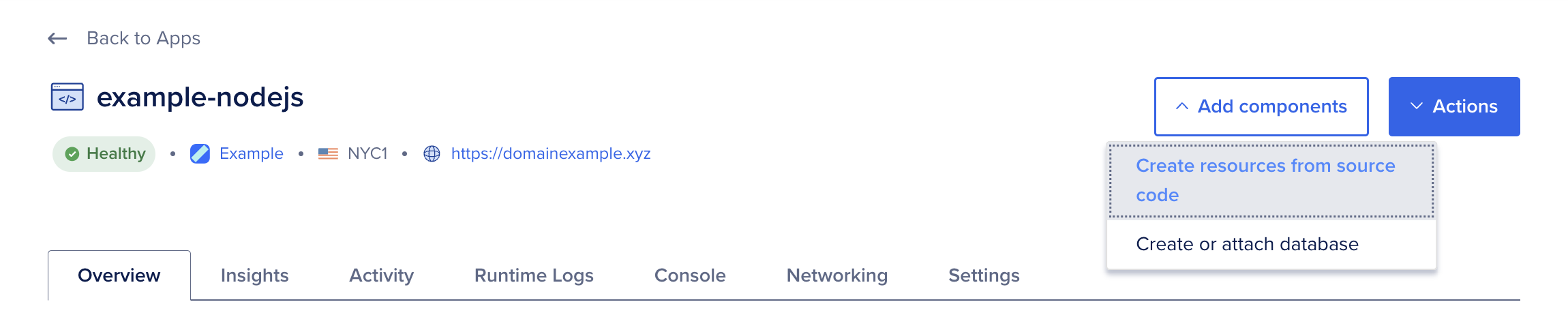
An App Platform app with the Add components menu selected, and the Create resources from source code option highlighted.

On the Add resources screen:

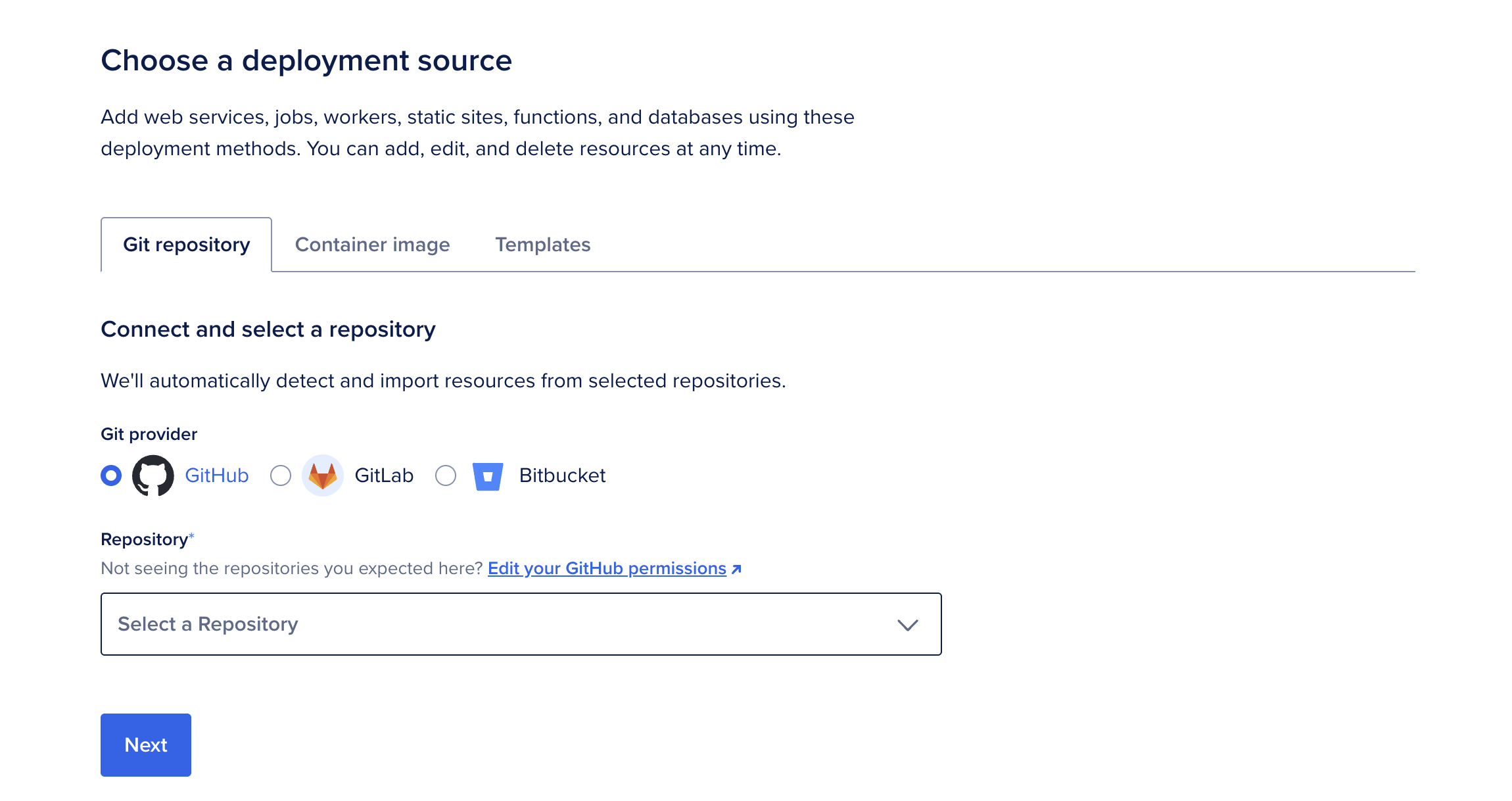
  • Select your deployment source, either a Git repository or a container image. If you have not previously created an app on App Platform, the repository service may prompt you to provide DigitalOcean with read permissions to your account.
  • If using a Git repository, choose a branch to deploy from. By default, App Platform builds from the repository's root. If your code lives in a subdirectory (for example, in a monorepo), set the source directory to match.
  • Clear the Autodeploy checkbox if you want to stop automatic redeploys when the repository changes.
  • Click Next.
The Create an app screen with the Git repository tab selected, and GitHub selected as the Git provider.

App Platform retrieves your code, analyzes your repository, and automatically selects the appropriate runtime (such as Node or Ruby). If you need to override this behavior, upload a Dockerfile to your branch and restart the creation process.

Configure Resource Settings

The Resource settings table displays the configuration settings, some of which the detection system auto-fills.
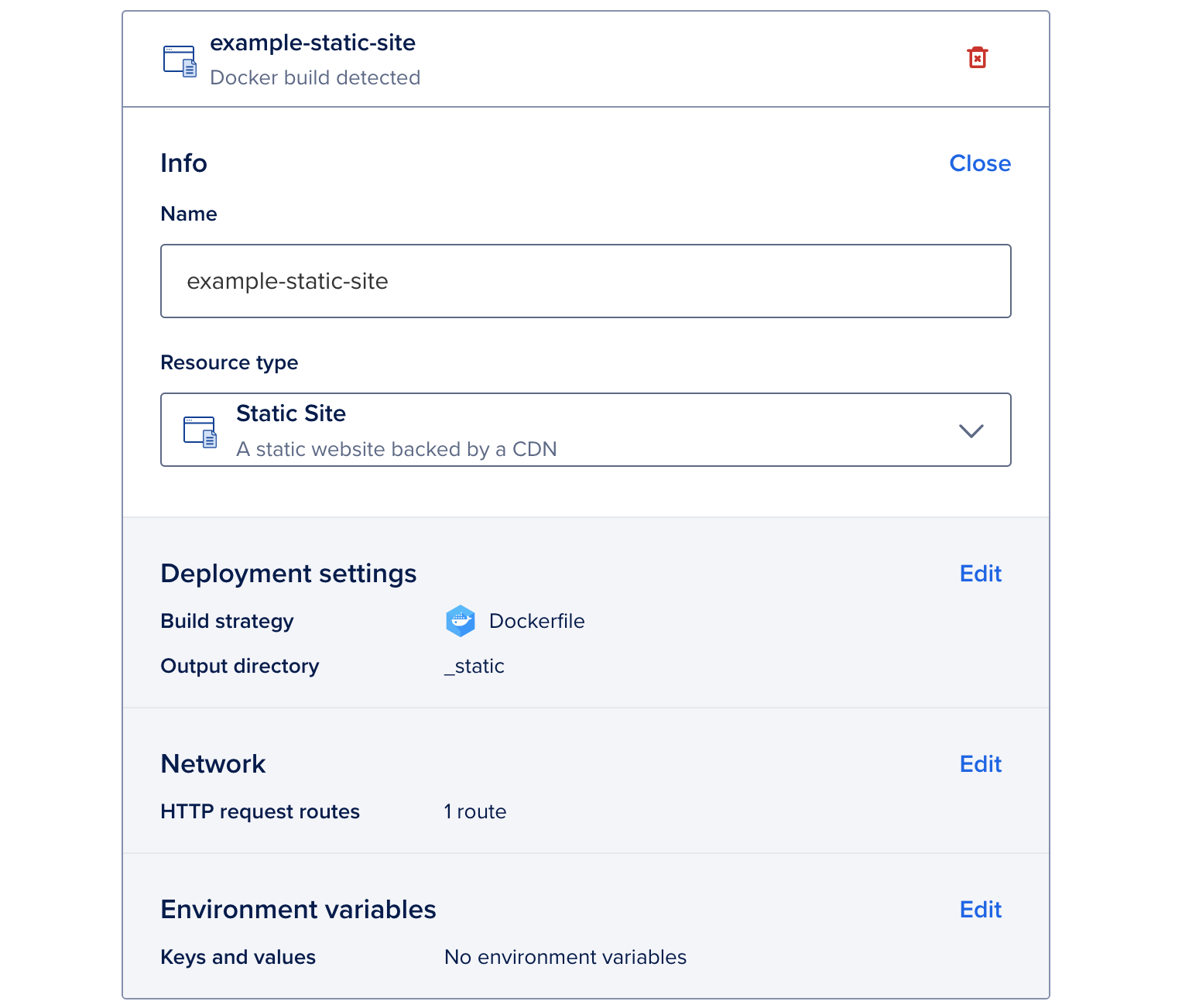
The Resource settings table with Static Site selected as the Resource type and configuration settings for a static site.

You can configure the following settings:

  • Name: A unique name for the component.

  • Resource type: The type of component to deploy (web service, static site, worker, or job).

  • Branch: The branch to deploy from. You can enable automatic redeploys when changes are made to this branch.

  • Output Directory: For static sites only. An optional path to where the build assets are located, relative to the build context. If not set, App Platform automatically scans for these directory names: _static, dist, public, build.

  • HTTP request routes: For web services and static sites only. The URL path where the app can be accessed, such as your-app-v3cl4.ondigitalocean.app/api. If not specified, the app is accessible from the provided hostname's root.

  • Environment variables: Key-value pairs available to your app at runtime that let you keep configuration separate from application code. Use them to provide secrets, API keys, and other external settings, such as connection details for an external database.

Set App-Level Environment Variables

App-level environment variables are available to all components in your app. Use them for shared configuration, secrets, API keys, or other values your app needs at build time or runtime.

To set app-level environment variables:

  • Click Edit in the App-level environment variables section.
  • Click Add environment variable, type a key and value, then select a scope.
  • Select Encrypt to obscure the value in build, deployment, and application logs.

For dynamic, app-specific variables that your app can reference, see Use Bindable Variables.

Review and Deploy

Review the configuration and pricing details in the Summary section, then click Add resources.

App Platform creates the component with the selected settings and deploys it automatically. You can view or update the component's configuration on the Settings page.

Configure a Static Site

Go to the Apps page, select your app, then click the Settings tab. Select the static site you want to edit.

Click Edit beside a setting you want to change, then click Save.

When an error occurs on the static site, App Platform displays an error document. You can specify a custom error document. Click Edit in the Custom Pages section.
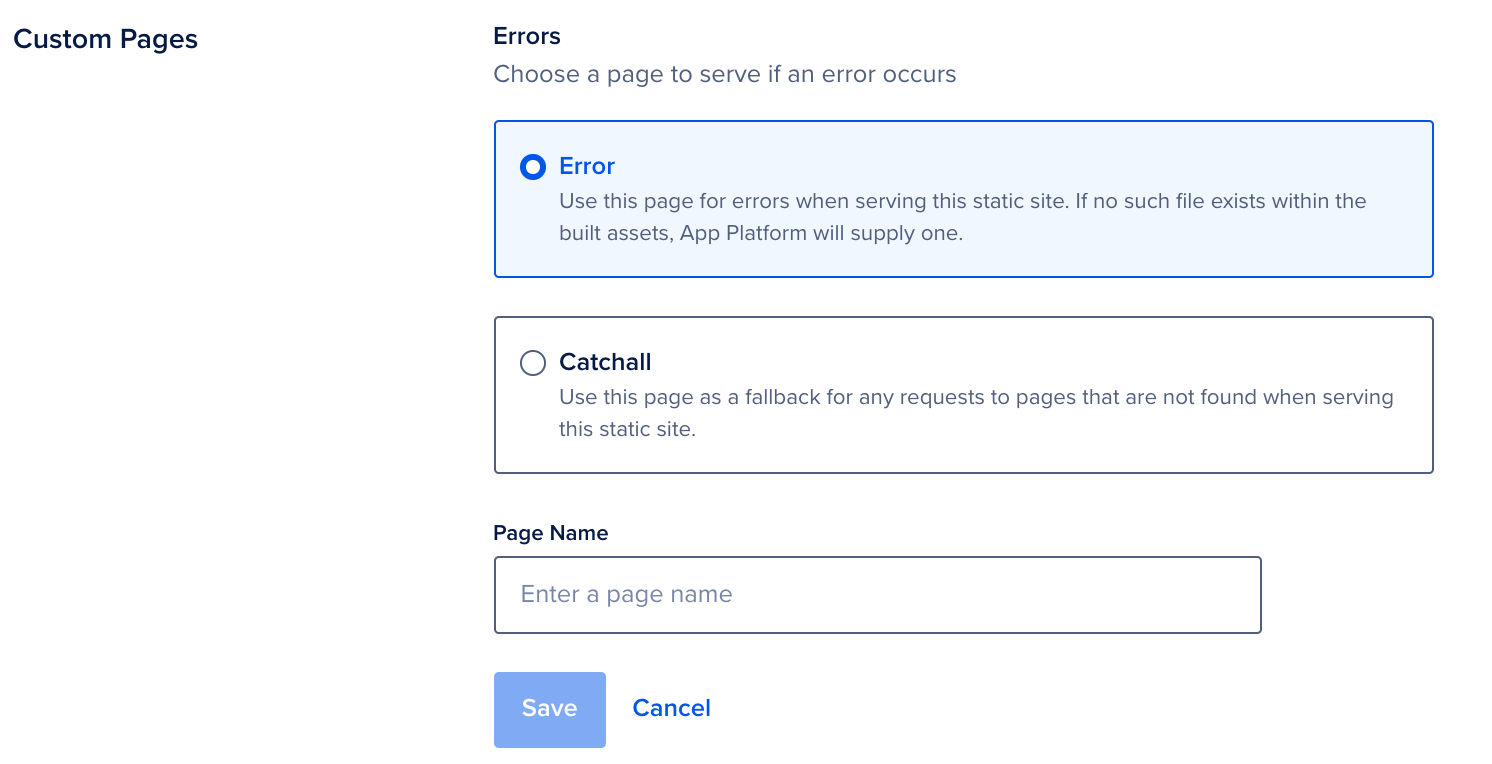
The Custom pages section showing the options for an error page to serve if an error occurs.

Select one of the following options:

  • Error: Specify a document to serve when an error occurs.

  • Catchall: Specify a catch-all document that the site uses to redirect requests to pages that are not found on the site.

Enter the name of the error or catch-all document in the Page Name field and click Save. The .html file must be in your repository for App Platform to use it in the build. App Platform uses a default document if you do not provide one. For static sites that have JavaScript-based client side routing, you can specify index.html as the catch-all document.

Destroy a Static Site

Go to the Apps page, select your app, then click the Settings tab. Select the static site you want to destroy.

At the bottom of the page, click Destroy Component. Enter the static site's name to confirm, then click Destroy.

We can't find any results for your search.

Try using different keywords or simplifying your search terms.